
Subcontractors with 20–100 employees should use a cloud-first backup and disaster recovery (BDR) strategy to protect project files, emails, accounting data, and job documentation across offices, jobsites, and mobile devices.
In practice, this typically costs $20–$60 per user per month (often bundled into a $125–$175 managed IT plan) and allows critical data to be restored within 4–12 hours instead of days or weeks.
For subcontractors, data loss isn’t just an IT issue—it directly causes missed deadlines, billing delays, rework, and insurance problems. Fast recovery keeps crews working and projects moving.
1. Identify Which Construction Data Is Mission-Critical
Not all data has the same impact when it’s lost.
For subcontractors, the most critical data typically includes:
- Project files (CAD, BIM, drawings, plans)
- RFIs, change orders, and contracts
- Email and collaboration tools
- Accounting, payroll, and billing systems
Why this matters:
Losing project data mid-job can delay inspections, approvals, and invoicing—sometimes for weeks.
Typical benchmark:
Active construction projects generate 5–20 GB of new data per month per project, depending on scope.
2. Use Cloud Backup Designed for Mobile Crews
Traditional on-site backups fail subcontractors because:
- Laptops and tablets move between jobsites
- Devices are lost, stolen, or damaged
- Office servers aren’t accessible from the field
Best practice for subcontractors:
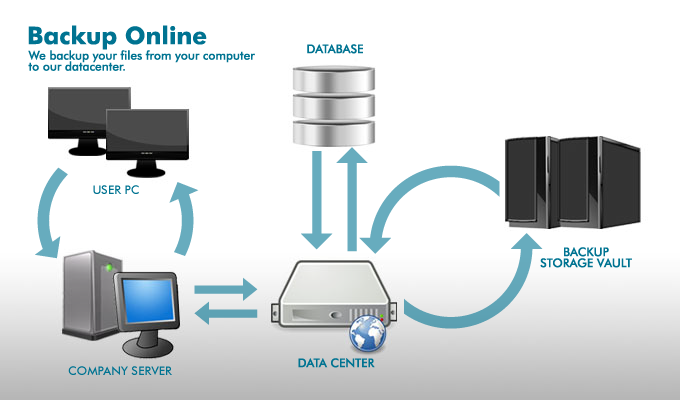
- Cloud-based backups with encryption
- Automatic backups for laptops and desktops
- Backup coverage for cloud apps (email, file sharing)
Recommended standard:
Backups should run multiple times per day, not just nightly.
Backup and recovery are often included in managed IT plans. For context, here’s what construction companies in Orange County typically pay for IT.
3. Set Realistic Disaster Recovery Expectations
Disaster recovery isn’t just about if data can be restored—it’s about how fast.
For subcontractors with active jobs:
- Crews need access to files the same day
- Delays stall work and billing
- Extended downtime creates contract risk
Typical expectations for construction firms:
- RTO (Recovery Time Objective): 4–12 hours
- RPO (Recovery Point Objective): same day or better
Slower recovery may be cheaper, but it often costs far more in lost productivity.
4. Protect Against Ransomware and Accidental Deletion

The two most common causes of construction data loss are:
- Ransomware
- Human error (accidental deletion or overwrite)
Effective protection requires:
- Immutable backups (cannot be altered or encrypted)
- Multiple backup versions
- Regular recovery testing
Why this matters:
Ransomware recovery for subcontractors often exceeds $50,000 when downtime and delays are included—far more than prevention costs.
5. Align Backup Strategy with Insurance Requirements
Many subcontractors don’t realize their backup strategy directly affects cyber-insurance coverage.
Common insurance requirements include:
- Encrypted backups
- Off-site or cloud storage
- Written recovery plans
- Proof of testing
Result:
Companies with compliant backup strategies experience:
- Faster insurance approvals
- Fewer coverage exclusions
- Smoother renewals
Backup is also a key cybersecurity requirement. Contractors should understand the cybersecurity risks unique to construction companies and how insurers evaluate them.
Not sure where you stand? We help construction companies identify IT risks, insurance gaps, and jobsite issues before they become problems
Real Subcontractor Backup Example
A subcontractor with 38 employees lost access to project files after a laptop was stolen and cloud syncing failed. Critical drawings were unavailable, and work slowed across multiple jobsites.
After implementing a construction-specific cloud backup and recovery plan:
- Project data was restored within 6 hours
- No data was lost across 5 active projects
- Insurance renewal was approved with no backup-related exclusions
- Crews resumed work the same day
What Proper Backup and Disaster Recovery Looks Like for Subcontractors
For most subcontractors, a solid BDR strategy includes:
- Cloud backups for devices and servers
- Protection for email and file-sharing platforms
- Fast, tested recovery procedures
- Ransomware-resistant backup storage
- Monitoring and ongoing management
This is typically included as part of a managed IT service rather than handled manually.
Final Takeaway
For subcontractors, data loss doesn’t just slow IT—it halts jobs, delays billing, and creates contract risk.
A cloud-first backup and disaster recovery strategy:
- Keeps crews productive
- Protects project timelines
- Satisfies insurance requirements
- Costs far less than recovery after an incident
The question isn’t whether subcontractors need backup—it’s how quickly they can recover when something goes wrong.
Talk to a Construction IT Expert
If you’re a general contractor or subcontractor with 20–100 employees and want to understand your real IT risks, costs, or gaps, talk to an expert who specializes in construction environments.
No pressure. Just clear answers.